
Teams グループチャットにファイルを添付し送信することができない場合があります/It may not be possible to attach and send files to Teams Group chats
(English version follows.)
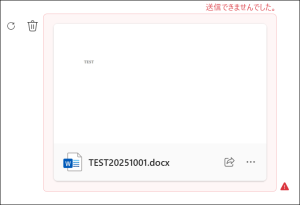
10月8日頃より、Teams で複数人のグループチャットでファイルを添付してメッセージ送信しようとすると、「送信できませんでした」とエラー表示され、メッセージ自体が相手に送られない現象が一部の利用者で発生しています。
※チーム及びプライベートチャットでは問題なく添付ファイルの送信は可能です。
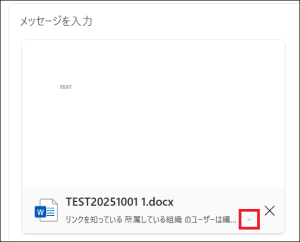
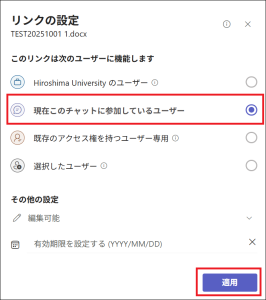
なお、ファイルを添付する際に、メッセージ入力欄の添付ファイルをクリックして、現れる共有の設定画面で「Hiroshima Universityのユーザー」から「現在このチャットに参加しているユーザー」に変更して適用すると、正常に送信できるようです。
赤文字のエラーメッセージがでますが気にせずに送信してください。
現在、Microsoft に問い合わせを行っております。
ご不便とご迷惑をおかけいたしまして申し訳ございません。
Starting October 8, some users have experienced an issue where they could not send messages that included attachments in Teams Group chats. These users received an error message that said, “The message could not be sent.”
*Attachments can be sent without any problems in team and private chats.
However, it appears that this issue can be resolved by clicking on the attachment file in the message input field, opening the sharing settings, and then changing the sharing permissions from “Hiroshima University users” to “Users in this chat.”
You will receive an error message in red, but please do not worry about it and send it.
We are currently working with Microsoft to resolve this issue.
We apologize for any inconvenience or disruption this may have caused.
(2025/10/8)